
LTC Claim Management Kit
A workbook and printable claim-management pages for the family member handling the paperwork side of a long-term care insurance claim — invoices, reimbursements, calls, requests and documents, kept in one record.
- A claim ledger for invoices, expenses and reimbursements
- Elimination-period tracking — your policy's stated target and the care days you mark
- Call records, and a list of requests and follow-ups
- A claim summary and document tracker for anyone joining halfway
Works with Microsoft Excel 2019 or later and Microsoft 365
$14.99
Purchase and delivery are handled by Etsy. There is no checkout on this site.
Text version of the video
- How the workbook works: a short walkthrough of the Excel workbook, shown with fictional sample data. Your workbook starts blank.
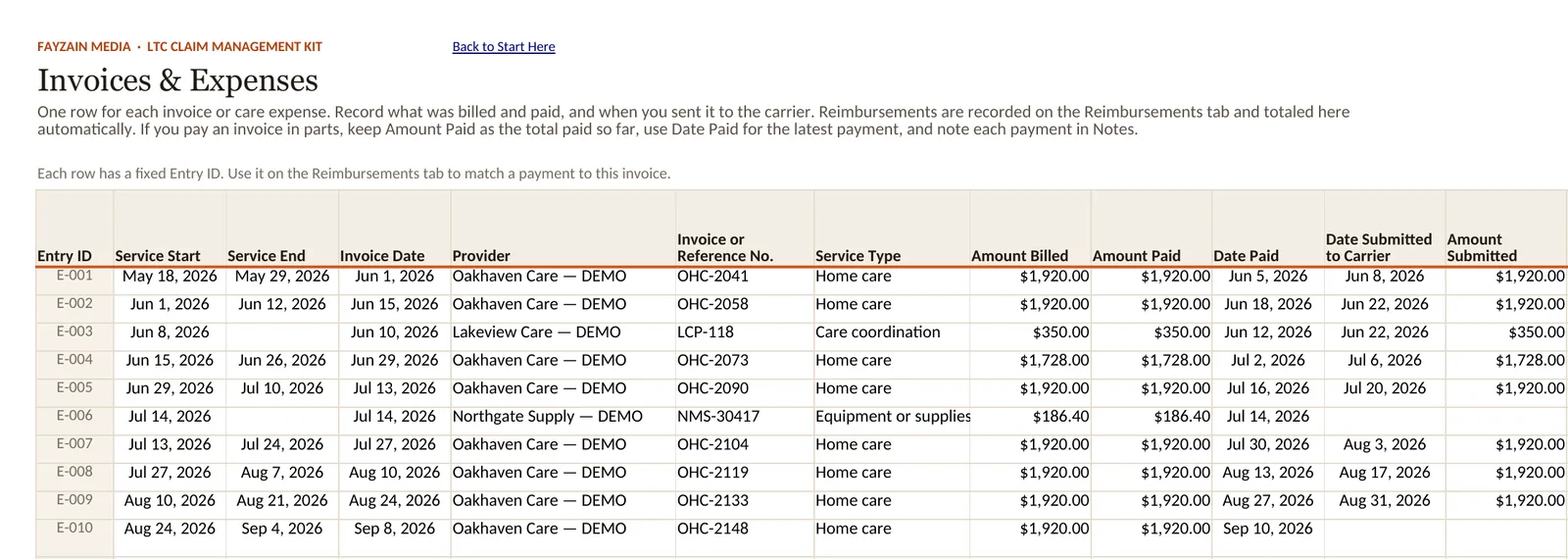
- Invoices & Expenses. Record each invoice: what was billed, what you paid, and when you sent it to the carrier.
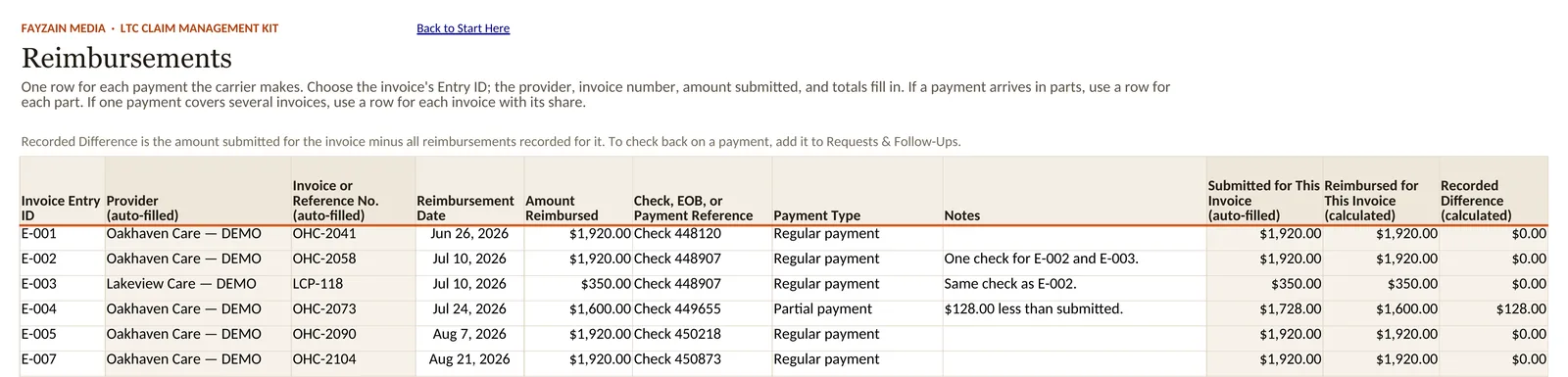
- Reimbursements. When the carrier makes a payment, add a row and choose the invoice's Entry ID. The provider and invoice number fill in. A reimbursement is recorded for invoice E-007.
- Reimbursements. Each invoice shows what was submitted, what has been reimbursed, and the recorded difference — here, $128.00 on one invoice.
- Claim Summary. The Claim Summary's totals update from the other tabs. Nothing is typed on it. Total reimbursed changes from $7,710.00 to $9,630.00.
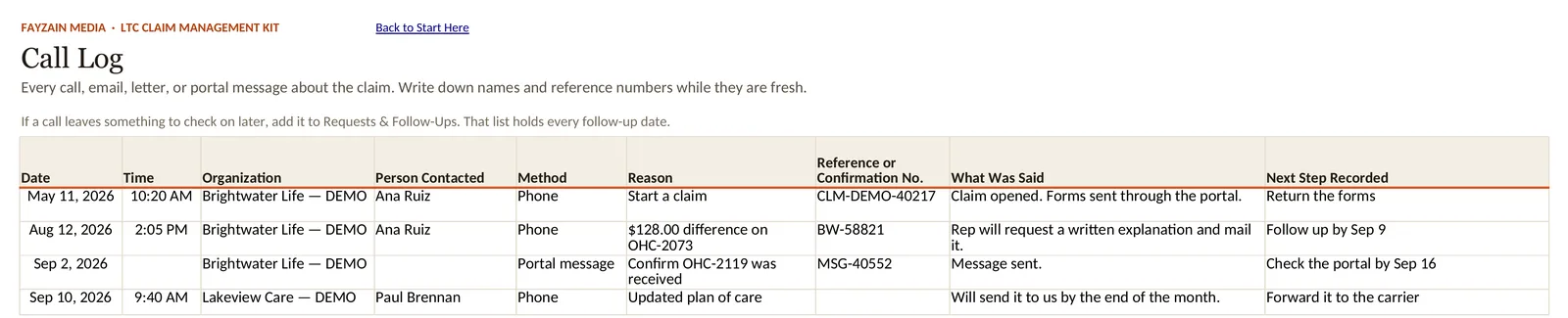
- Call Log. Log each call: who you spoke with, what was said, any reference number, and the next step.
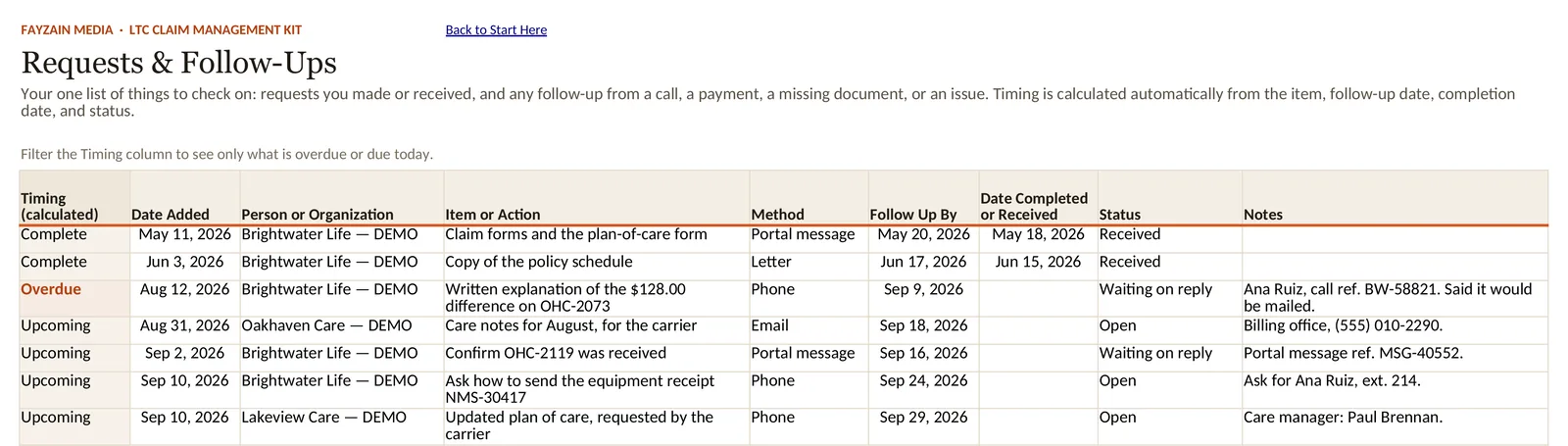
- Requests & Follow-Ups. One list of what to check on. The Timing column marks what is overdue or coming up, from the dates you enter. One request is marked Overdue.
- Claim Summary. The Claim Summary shows the whole claim at a glance: money recorded, follow-ups and open items.
- One organized record of the claim: invoices, reimbursements, calls and follow-ups in one Excel workbook, with printable pages for a binder.
- Fictional sample data shown. Your workbook starts blank. An organization and recordkeeping kit — not insurance, legal, medical, tax or financial advice.
Who it is for
The adult child, spouse or other family member who has ended up handling the administrative side of a long-term care insurance claim — often alongside a job, and often at a kitchen table covered in envelopes.
What it helps with
A long-term care claim is rarely one form. It is months of invoices from care providers, reimbursements that arrive for some of them and not others, an elimination period to keep count of, calls that need a record, and requests for documents you may already have sent.
The kit gives all of that one consistent place to be written down, so the record is complete when you need it: on a call, in a letter, or when a sibling takes over for a month.
What is included
- Workbook (XLSX) — the working record: claim and policy details, contacts, the elimination period, invoices and expenses, payments, submissions, reimbursements, calls and correspondence, requests and follow-ups, documents and a monthly ledger. It calculates totals, open items and a claim summary as you go.
- Printable pages — a US Letter PDF of the record on paper, for a claim binder and handwritten notes.
- Invoice ledger (CSV) — a blank, standalone invoice ledger with column headings only, separate from the workbook.
- Start Here guide — a PDF on setting up and using the kit.
How it is used
Start with the Start Here guide. Enter the claim and policy details once; after that, add to the record as invoices, payments, calls and letters come in — a few minutes each time, rather than an afternoon reconstructing it later.
Use the workbook, the printed pages, or both. The printable pages are reusable: print more of whichever ones fill up first.
A closer look
 (full-size image)
 (full-size image)
 (full-size image)
 (full-size image)
The kit also includes printable pages for key claim records, for families who prefer a paper binder or writing by hand.
Related reading
Free articles on the same subject.
- How to organize a long-term care insurance claim without losing track of the details
- How to track an elimination period for a long-term care insurance claim
- How to track long-term care insurance invoices and reimbursements
- Before you call about a long-term care insurance claim